
Aesthetic Travel Snaps: Edit With Pro Vintage Filters
Turn your vacation photos into cinematic memories. Learn how to edit travel snaps with pro vintage filters for timeless, moody aesthetics.

Deb Miller
Senior Visual Effects Artist & Photo Editor. Expert in atmospheric overlays, color grading, and digital compositing.

Travel photography has a problem. We go to these breathtaking places - Kyoto, Paris, the Grand Canyon - and we take the exact same photo as the million people who visited before us.
When you look at your camera roll, the photos are sharp and colorful, but they often feel like postcards. They document the place, but they don't capture the feeling of being there.
That is where a good editing style comes in. By applying a cohesive vintage filter, you can transform a generic tourist snap into a cinematic memory. It’s what separates a "vacation dump" from a "travel diary."
Why Travel Photos Need "Mood"
Direct sunlight is harsh. It washes out colors and creates ugly shadows. Unless you are waking up at 4 AM for sunrise everyday (and let's be honest, you're on vacation), your lighting won't always be perfect.
Vintage filters are a cheat code for this.
- They manage highs: They soften those blown-out bright skies.
- They unify colors: They pull all the random colors of a busy street into a single palette.
- They add texture: As we discussed in our guide on film grain, adding texture makes a digital image feel gritty and real.
1. The "Cinematic" Landscape (Cool Tones)
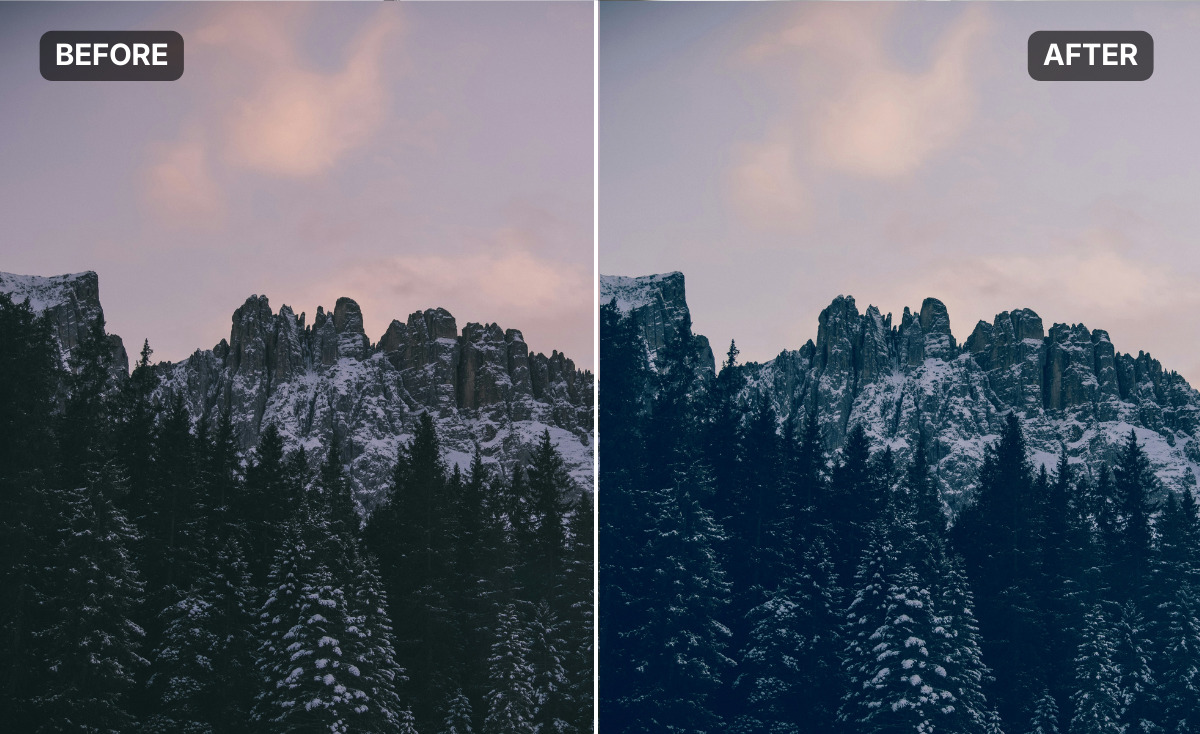
When you are shooting mountains, oceans, or rainy city streets, you want drama. You want the photo to feel big and slightly mysterious.
The Look: Aged Teal
Hollywood movies often use a "Teal and Orange" grade. Our Aged Teal and Verdigris presets do this automatically. They cool down the shadows, adding beautiful blues and greens to the dark parts of the image, while keeping the highlights relatively warm.
- Best for: Misty mornings, ocean views, and urban concrete.
- Why it works: It removes the neon brightness of modern digital sensors, making the landscape feel ancient and permanent.
2. The "Sun-Drenched" Memory (Warm Tones)
For beach trips, desert hikes, or summer in Italy, you want the opposite. You want heat. You want the viewer to feel the sun on their face.
The Look: Copper
The Copper preset is like putting on a pair of high-end sunglasses. It warms up the entire image, turning harsh white light into a soft golden glow.
- Best for: Sunsets, sand, and golden hour portraits.
- Why it works: It boosts the "temperature" of the photo emotionally. It makes the memory feel happier and more nostalgic.
How to Edit Travel Photos in Batch
The key to a great travel album is consistency. You don't want one photo to be blue and moody while the next is bright yellow.
- Pick a "Trip Theme": Decide before you edit. Is this a "Cool" trip (London, Seattle) or a "Warm" trip (Mexico, Rome)?
- Open ImagiTool: Go to the vintage editor.
- Apply Your Base:
- Use Verdigris for that cool, moody cinema look.
- Use Copper for that warm, summer holiday look.
- Adjust Gamma: Travel photos often have dark shadows. Use the Gamma Slider to lift them just enough to see the details without losing the mood.
FAQ: Aesthetic Travel Editing
Should I edit my photos while traveling?
I recommend waiting until you get home. Editing on a small phone screen in bright sunlight is hard. You will often make photos too bright. Wait until you can see them on a bigger screen.
How do I fix a boring sky?
If the sky is just flat white, use a preset like Wash or Faded. These will tint the white sky slightly, making it feel intentional rather than just "overexposed."
Can I mix different presets in one album?
Try to stick to the same "family." You can mix Aged Teal with Verdigris because they share cool tones. But mixing Aged Teal with Copper might look jarring next to each other.
Don't let your travel memories sit in a folder looking like stock photography. Give them the cinematic treatment they deserve. With the right vintage filter, you can turn a simple trip into a beautiful story.
Ready to edit your vacation snaps? Try Aged Teal on your next landscape.


